Saturday, August 11, 2012

Creative Inspirations with King of my Heart

I have a couple of layouts for you this morning from my latest kit, King of my Heart. Hope this gives you some ideas on how to scrap some of your photos!

Karla, one of my Creative Team members at Scrapable, created this adorable layout. I love the clustering she did!


This layout was done by me using the August Template from the Template Challenge going on at Scrapable this month. I modified it some but you ought to click on the link above and download it and play along with us.


Remember you can find this kit and more at my shop at Scrapable!

Thursday, August 9, 2012

King of my Heart - new kit this week!

If you saw my latest Facebook Exclusive last week, then this new kit might look a little familiar. That Exclusive was actually the "prequel" to my new kit, King of my Heart. Therefore, when you purchase my kit you can also get the Facebook Exclusive (while it lasts) and it's like having an extra add-on for the kit!

Here's the kit itself:


You can find it today at my shop at Scrapable.

And one more thing, if you were a subscriber to my newsletter, you would get this Quick Page that goes along with it! In fact, if you subscribe TODAY, you would get this QP because my newsletter doesn't go out until tomorrow.


Tuesday, August 7, 2012

New Challenge for August

I am hosting a Pinterest Challenge this month at Scrapable and I just wanted to share with you what it is all about. I saw a similar idea (probably on Pinterest!) and just had to do one for myself. The idea is to take a screen shot of your Pinterest boards and then make a layout with that as the main photo. As you can see from mine, I kept it large enough that the boards were my ONLY photo on the page. Later I can look back and see what I was interested in at this particular time and see how my interests might have changed.
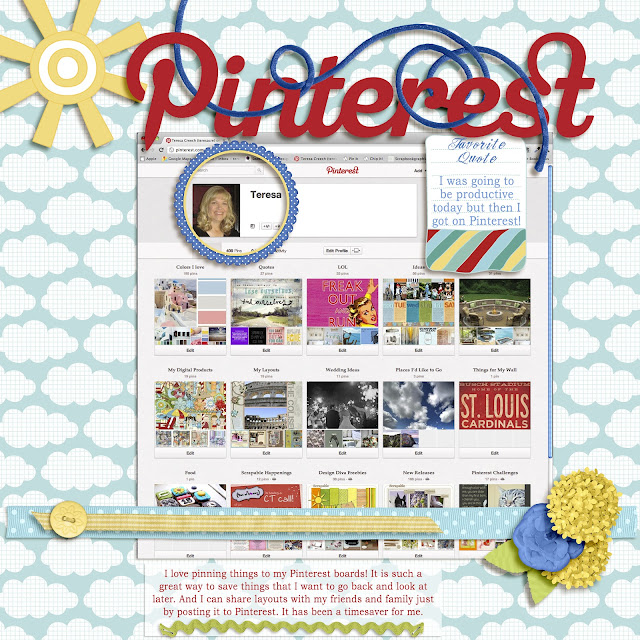
Come play along with me at Scrapable and show me your "take" on this Challenge!


UPDATE: I put the instructions on how to take a screen shot in the challenge post at Scrapable but I will include them on this page, too.


On a Mac: Open the page in your browser that you want to copy and hold down Command, Shift and the number 3. You should see a jpeg copy of your entire desktop show up on your desktop! Open your photoshop program then open the saved jpeg from your desktop.

On a PC: Open the page in your browser that you want to copy. Press the Print Scrn/SysRq button at the end of the row of function keys on your keypad. That puts the page on your clipboard. Open your photoshop program and the page you are creating and press Ctrl + V to paste it on your page. If you have Vista or Windows 7, you can use the built-in Snipping Tool to capture the screen you want to copy.

Saturday, August 4, 2012

New Facebook Exclusive Available Today

I have a new Facebook Exclusive on my Fan page today. Just click on the Facebook link on my sidebar and then go to the Exclusives area. If you haven't already "Liked" my page, be sure to do that to get access to the Exclusive.

Here's the preview:


Hope you like it!

Friday, August 3, 2012

What's new...

Although I am not releasing a new kit this week, there is still plenty to shop for at Scrapable.  Our newest collab for August is out and it is titled "All About Me".  You can purchase it for $5 or it is free with any purchase of $10 or more.

Here's the preview:

You can find it here.